![logo-Clare-white-TM.png]](https://www.clarecontrols.com/hs-fs/hubfs/logo-Clare-white-TM.png?height=40&name=logo-Clare-white-TM.png)
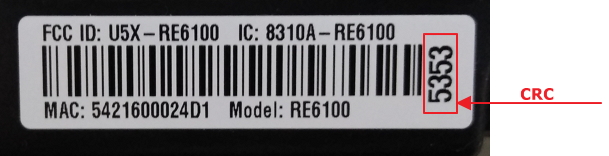
The CRC code of the Connect+ security panel is required for activation of monitoring through ClareNet. It is located on the bar code label which is affixed to Connect+ security panel as shown below. After inserting the required information in Clarenet, including the CRC, click the activate button.
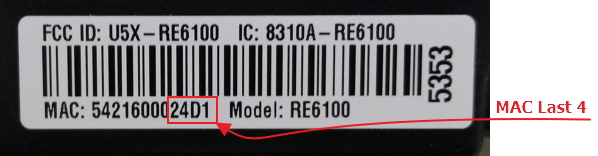
In the event that the CRC does not work that you receive an invalid/incorrect CRC error message, insert the last four of the Connect+ security panel as shown below. After inserting the required information in Clarenet, including the CRC, click the activate button.
In the rare event that both the CRC and last four of the MAC fail when activating the Connect+ security panel, please contact technical services.
Links to additional ClareNet and Connect+ documentation.
- ClareNet Security Alarm Reporting Portal
- What should a dealer know about ClareNet
- ClareNet Activation Portal Configuration Tech Bulletin