![logo-Clare-white-TM.png]](https://www.clarecontrols.com/hs-fs/hubfs/logo-Clare-white-TM.png?height=40&name=logo-Clare-white-TM.png)
Suspend accounts
Dealers can suspend/re-activate existing accounts and delete accounts with no assigned controller. When an account is suspended, mobile users are removed from the account and can no longer access their project.
IMPORTANT NOTE: Cellular and security services must be de-activated prior to suspending an account.
To suspend the account:
- Access the account list, select the checkbox next to the desired account, click the Select an Action drop-down menu, and then click Suspend.
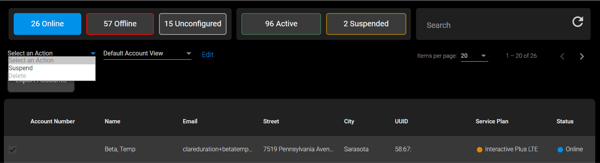
The Suspend account popover displays.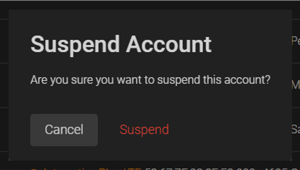
- Click Suspend.
Last Updated: 06/03/2021