![logo-Clare-white-TM.png]](https://www.clarecontrols.com/hs-fs/hubfs/logo-Clare-white-TM.png?height=40&name=logo-Clare-white-TM.png)
Company Administrators can delete an entire Account, completely removing it from FusionPro. An Account has to be suspended before it can be deleted.
Suspended Accounts can be re-instated. Be aware that suspending an Account will automatically deactivate monitoring Interactive Services and downgrade the service plan to Basic.
Note: Once an Account is deleted, it cannot be reversed and the Account will no longer be linked to a ClareOne system. Deleting an Account does not reset a ClareOne Panel which must be reset before using it on a different account.
- Open the Accounts list view in FusionPro.
- Check the checkbox next to the account you would like to delete.
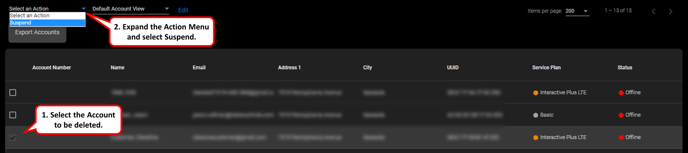
- Expand the Actions Menu and select Suspend.
- Tap Suspend on the popup menu and wait for the process to finish.

- Switch the filter to Suspended to view suspended Accounts.
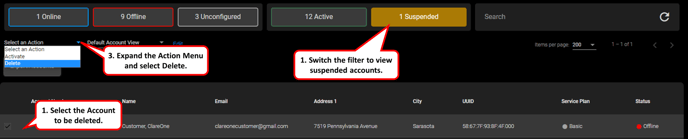
- Check the checkbox next to the account you would like to delete.
- Expand the Actions Menu and select Delete.
- Confirm account deletion by inputting the UUID of the attached ClareOne Panel.
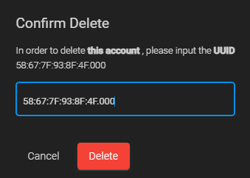
- You are done!
Last Updated: 4/19/2023