![logo-Clare-white-TM.png]](https://www.clarecontrols.com/hs-fs/hubfs/logo-Clare-white-TM.png?height=40&name=logo-Clare-white-TM.png)
Account list view
User can now customize and share account list views. Once list views are created, the user can export them in a CSV.
To create custom list views:
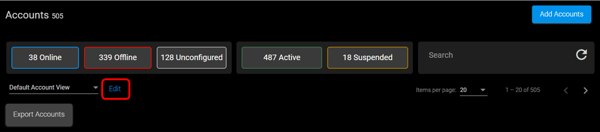
- Access Accounts.
- Click Edit.
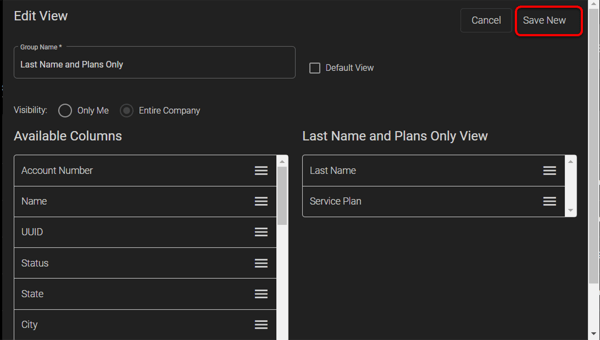
- Name the filter, select the visibility option, and then drag any desired columns into the field on the right.
- Click Save New.
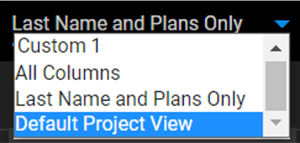
- Select the Default Accounts View drop-down, and then select the created view.
Accounts display according to the selected view.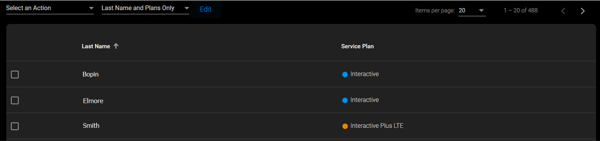
To export the account list:
- Click Accounts, and then select the desired account filter option. This can be a custom created list or by using the existing filter options (Online, Offline, Unconfigured, Active, Suspended).
- Click Export Accounts.
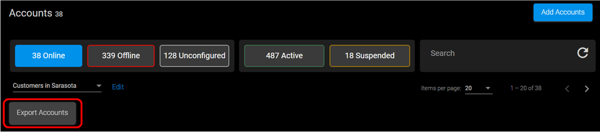
The accounts are exported in a CSV.
Last Updated: 06/03/2021