![logo-Clare-white-TM.png]](https://www.clarecontrols.com/hs-fs/hubfs/logo-Clare-white-TM.png?height=40&name=logo-Clare-white-TM.png)
Introduction
The purpose of this document is to go over the installation of a memory card in the 2 MP Turret Camera.
Installation
Use the following instructions to install the memory card.
To install the memory card:
- Disassemble the camera.
- Rotate the trim ring counter-clockwise to take it off from the camera.
- Loosen the fixing screw. Take the mounting base off from the camera and the enclosure.
- Separate the camera and the enclosure.
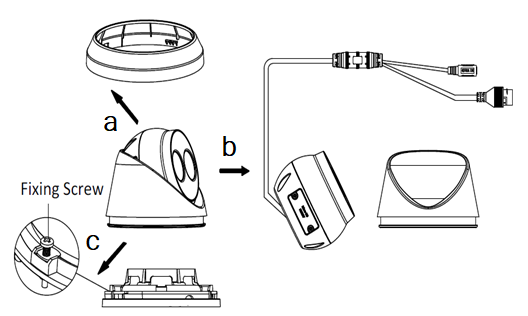
- Install the memory card.
- Unscrew the memory card slot cover.
- Insert the memory card.
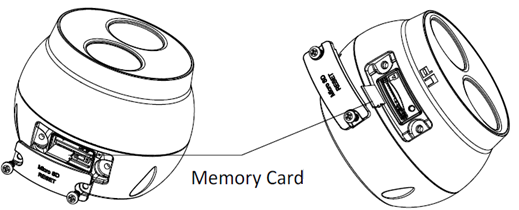
- (Optional) Remove the memory card.
- (Optional) to unmount the memory card, push to get it ejected.
- Screw the memory card slot cover back.
- Reassemble the camera.
- Attach and secure memory card slot cover.
Note: Ensure that when the memory card slot cover is secured that the black weather sealing is intact and not crimped or folded. - Resecure the camera to the enclosure.
- Secure the fixing screw. Reattach the mounting base to the camera.
- Rotate the trim ring clockwise until secure.
- Attach and secure memory card slot cover.